AI agent tuning lab
A cybersecurity platform runs hands-on practice for banks, retailers, telcos, and hospitals — a "Lab" is a live, scored exercise where someone practises a real security skill instead of reading about it. They had just shipped a new lab type, the AI Agent Lab, where the skill being practised is configuring and supervising a live AI agent instead of solving a fixed scenario. That needed a design solution built for it, not a reskin of an existing lab.
The problem
AI agent practice was ready, the UX wasn't.
The platform shipped a new kind of lab where the skill being practiced is prompting and steering a live AI agent inside a real cost budget — not solving a fixed scenario. That's a genuinely new interaction, and nothing existing was built for it: no way to edit a prompt against a live run, watch cost move in real time, or score "getting better at steering AI" instead of pass/fail recall. It needed a new product experience, designed end-to-end.
The principles
Five principles I designed against
An agent experience is complicated — someone is configuring, trusting, and staying accountable for a system that acts on its own. These are the AI-specific design principles I designed against for it.
Start with the user, not the interface
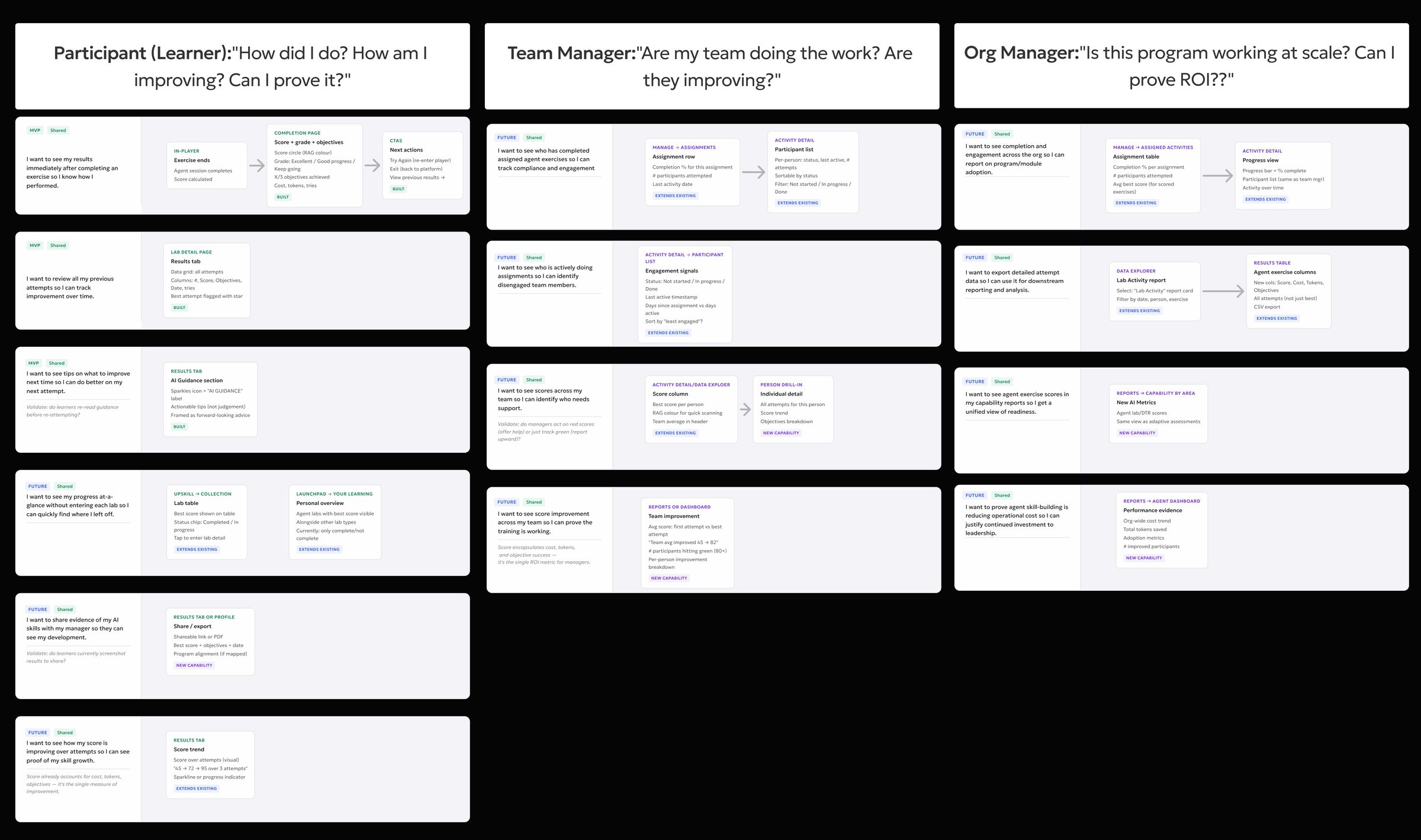
Before anything is designed, you start with your target personas — that matters even more when what you're designing is AI for real people. Two personas drove this: the participant tuning the agent, and the manager who needs to know whether their team is getting better at it.
Audit before you build
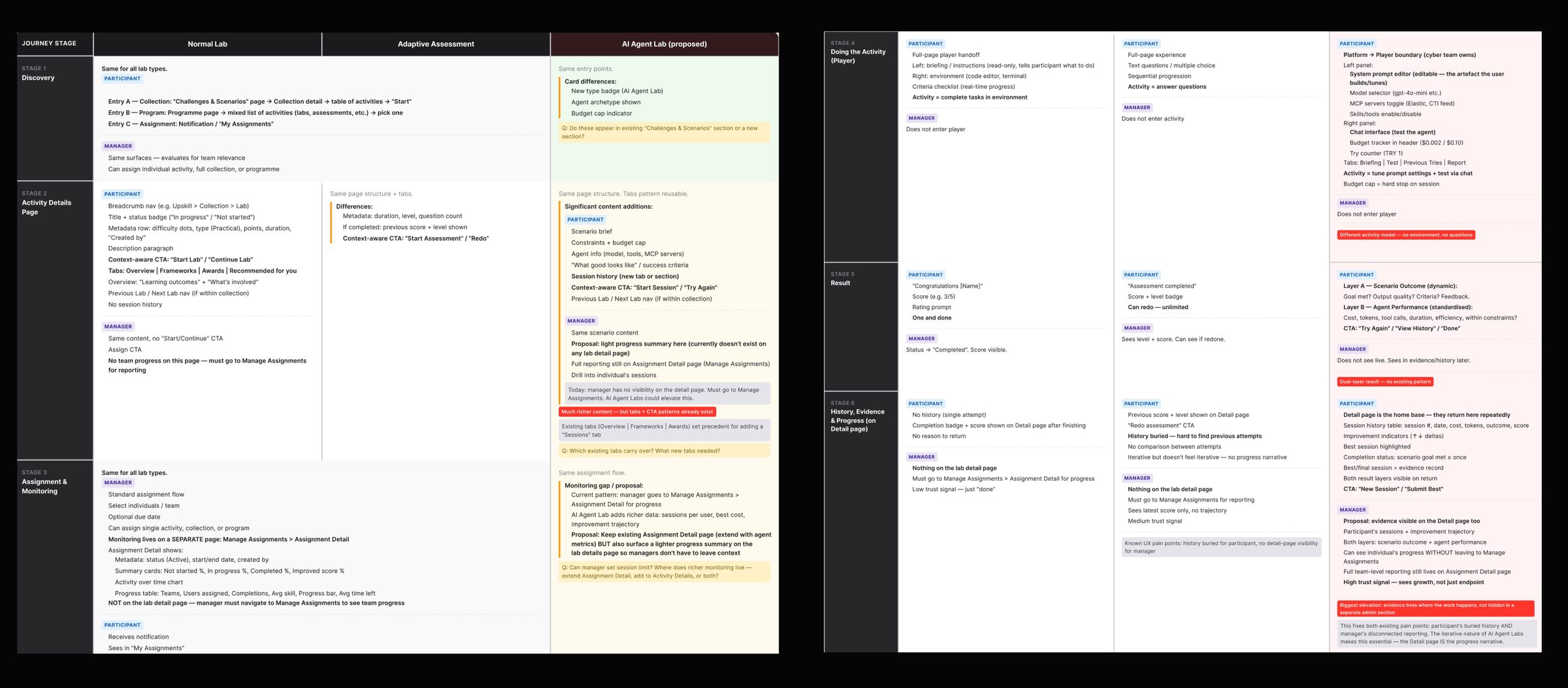
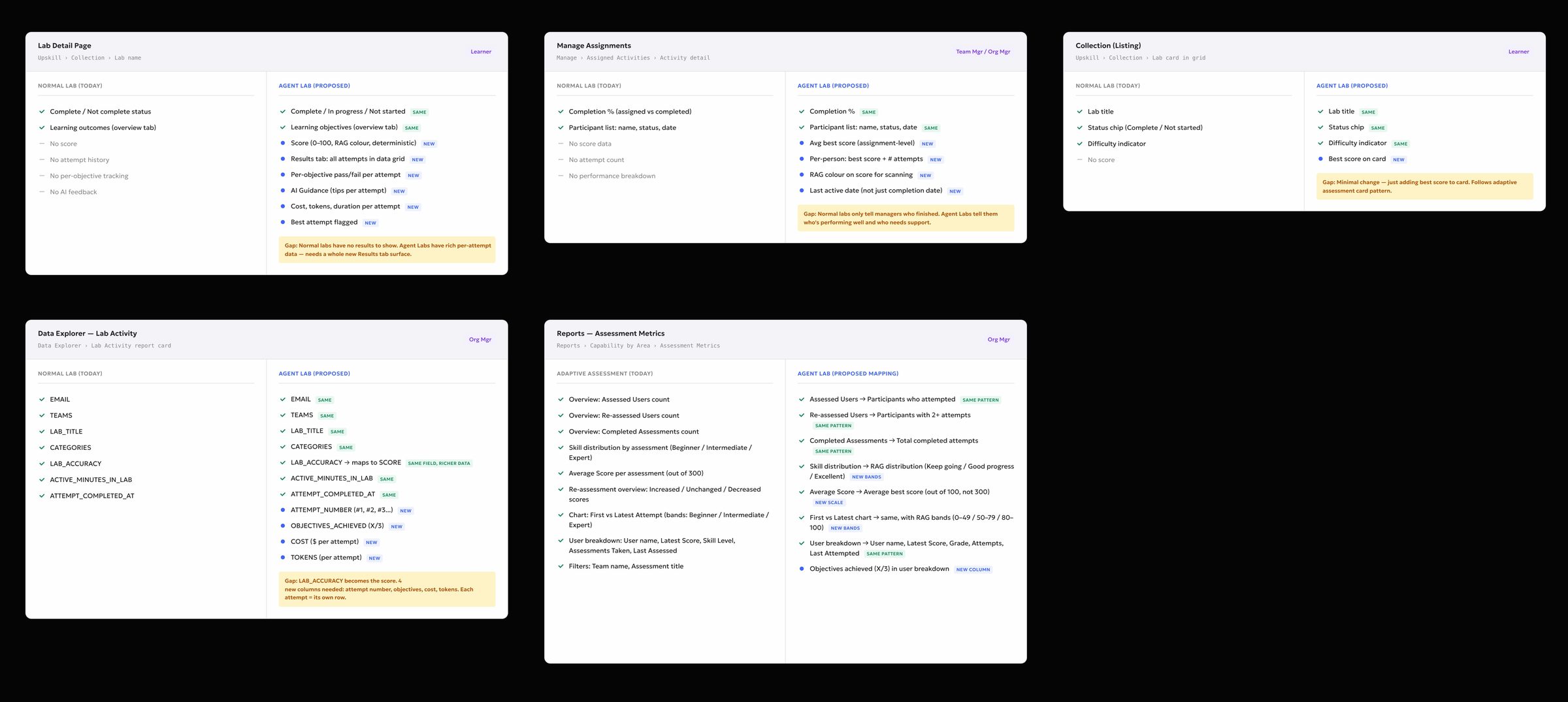
Before designing anything new, I audited what already existed against what these personas needed: Standard Lab and Adaptive Assessment, next to what the AI Agent Lab had to become.
That audit produced three artifacts: a stage-by-stage flow comparison, a field-level content model, and where the new format sits in the product hierarchy.
Designing for AI compliance
Scoring someone's use of an AI agent isn't just a design call — the EU AI Act and GDPR both regulate it directly. A few decisions came straight out of that:
How this is scored
Objectives met, weighted against token spend and tries against this exercise's budget. A person reviews any session where cost or score jumps sharply between attempts.
How this is scored
Objectives met, weighted against token spend and tries against this exercise's budget. A person reviews any session where cost or score jumps sharply between attempts.
How this is scored
Objectives met, weighted against token spend and tries against this exercise's budget. A person reviews any session where cost or score jumps sharply between attempts.
Three grading levels on the same score card — Excellent, Good progress, and Keep goingScroll sideways to compare outcomes
Make complicated AI interaction intuitive
Tuning an agent isn't one activity — it's editing a prompt, watching a live run, reading the agent's own reasoning, and checking what it actually did with its tools, all at the same time, with cost moving in the background. Lose track of any one of those and you lose track of what's actually making you better at steering it — that's a different design problem than a normal chat UI, and it's not just a cost problem. Five things mattered most:


 21 tools granted Configure
 Thinking
Hi there! How can I help today?
- I can pull and post today's CTI daily digest to the SOC Slack.
- I can triage a specific indicator (IP/domain/hash) or look up a threat actor.
- I can summarize recent feed activity for a custom timeframe.
If you want the daily digest, say "run today's digest" and I'll proceed.
run today's digest
Thinking
| Started | Model | Tokens | Latency | Spend |
|---|---|---|---|---|
| 16:28:28 | openai/gpt-5 | 2,516 → 308 | 13298 ms | $0.0068 |
| 16:28:52 | openai/gpt-5 | 2,606 → 309 | 8106 ms | $0.0030 |
Previous tries and the score reportBriefing · Chat · Previous tries · Report
Show the AI reasoning, not just the suggestions
It would have been easy to generate a tip and just state it — "set a token ceiling" — and move on. But a suggestion with no visible reasoning is asking someone to trust an AI's judgment on faith, which is exactly what Principle 03 already ruled out for the score itself. So every suggestion in the Results tab expands into what it's actually based on — the sessions compared, the pattern found — before anyone has to act on it.
This also fixed a real gap in the existing report pattern, which ranked people by activity — who'd clicked the most. That rewards logging in, not competence, and says nothing useful about a skill nobody has practised yet. The Results tab replaces a ranking with a reason.
Results
Your attempt history for this lab — expand any row to view full details.
Your agent handled the planted prompt injection correctly — it summarised the support tickets as asked and refused the instruction to exfiltrate the database. Tool use stayed within least privilege, with no destructive or high-impact calls.
One improvement: revoke any tools the agent was granted but never needed for this task. Extra permissions widen the blast radius if a future injection succeeds.
Add an explicit refusal pattern in the system prompt for data-exfiltration requests, so the same behaviour holds when the injection is phrased differently.
Why this
This guidance is based on attempt #3's objective and tool log: all three objectives were met — including the planted-injection and destructive-tool checks — on a single try at $0.0006 / 3,298 tokens, with no unused high-impact tools invoked. Revoking unused permissions and adding an explicit refusal pattern are the two changes that would harden that same successful behaviour against a differently worded injection on the next attempt.
The Results tab — AI guidance with the reasoning shown, not just the tip“Why this” expanded by default
Part two — Reporting surfaces
Designed around the persona and the need first
Same raw session data, mapped to what each of these four people actually needs first:
Before a manager can write a report or hand evidence to compliance, they need the sessions themselves — every score, cost, and try, filterable and exportable. That's Data Explorer.
Data Explorer
Explore and download data from the platform
AI Exercises
Metrics from interactive agent-based exercises (AI Agent Labs and AI Ranges) where users engage with an AI agent across multiple scored attempts. Includes objectives achieved, score, token spend, cost, and active time by user, team, and exercise.
| EMAIL ↕ | TEAMS ↕ | EXERCISE_TITLE ↕ | EXERCISE_TYPE ↕ | SCORE ↕ | ATTEMPT ↕ | OBJECTIVES ↕ | OBJECTIVES_COMPLETED ↕ | TOKEN_USED ↕ | COST ↕ | ACTIVE_TIME ↕ | TRIES ↕ |
|---|---|---|---|---|---|---|---|---|---|---|---|
| alex.morgan@shieldpath.test | SOC Team A | SOC Triage Agent | Agent Lab | 88 | #4 | 5 | 5 | 4,210 | $0.012 | 18m | 4 |
| alex.morgan@shieldpath.test | SOC Team A | SOC Triage Agent | Agent Lab | 74 | #3 | 5 | 4 | 5,880 | $0.019 | 24m | 3 |
| alex.morgan@shieldpath.test | SOC Team A | SOC Triage Agent | Agent Lab | 55 | #2 | 5 | 3 | 7,140 | $0.028 | 31m | 2 |
| alex.morgan@shieldpath.test | SOC Team A | SOC Triage Agent | Agent Lab | 31 | #1 | 5 | 2 | 9,020 | $0.041 | 42m | 1 |
| jordan.hayes@shieldpath.test | SOC Team A | SOC Triage Agent | Agent Lab | 72 | #3 | 5 | 4 | 5,460 | $0.017 | 22m | 3 |
| jordan.hayes@shieldpath.test | SOC Team A | SOC Triage Agent | Agent Lab | 58 | #2 | 5 | 3 | 6,910 | $0.025 | 29m | 2 |
| jordan.hayes@shieldpath.test | SOC Team A | SOC Triage Agent | Agent Lab | 40 | #1 | 5 | 2 | 8,330 | $0.036 | 37m | 1 |
| priya.nair@shieldpath.test | SOC Team B | SOC Triage Agent | Agent Lab | 65 | #2 | 5 | 3 | 6,120 | $0.021 | 26m | 2 |
| priya.nair@shieldpath.test | SOC Team B | SOC Triage Agent | Agent Lab | 42 | #1 | 5 | 2 | 7,850 | $0.033 | 34m | 1 |
| casey.reed@shieldpath.test | SOC Team B | Offensive Red Team | AI Range | — | #1 | — | — | — | — | 12m | 1 |
| sam.torres@shieldpath.test | SOC Team B | SOC Triage Agent | Agent Lab | 41 | #1 | 5 | 2 | 8,040 | $0.034 | 35m | 1 |
| riley.nguyen@shieldpath.test | SOC Team A | SOC Triage Agent | Agent Lab | 33 | #2 | 5 | 1 | 9,480 | $0.044 | 41m | 2 |
| riley.nguyen@shieldpath.test | SOC Team A | SOC Triage Agent | Agent Lab | 20 | #1 | 5 | 1 | 11,200 | $0.052 | 48m | 1 |
Once the raw data exists, an org manager still needs to see it at a glance — which exercises are underused, which teams are ahead, which are falling behind. Capability by Area rolls the same sessions up by exercise and by team — the surface an org manager actually opens first, before ever going to Data Explorer.
Agent Tuning Labs
Overview
Score distribution by exercise
| Exercise Title | Average Score | Score Distribution |
|---|---|---|
| SOC Triage Agent | 68 | |
| Phishing Response Agent | 72 | |
| Threat Intel Analyst | 54 |
Exercises with limited coverage
Agent Tuning exercises where fewer than 3 users have achieved a passing score. These represent capability gaps for AI operations.
| Exercise Title | Users with passing score | Total attempts | Risk |
|---|---|---|---|
| Threat Intel Analyst | 1 | 4 | High |
| Vulnerability Prioritisation Agent | 2 | 3 | High |
| Malware Triage Agent | 2 | 6 | Medium |
Score distribution by team
Average Agent Tuning score by team.
Results
Strong early signal from the people who need this
Reflection
What this taught me about designing for AI features
The hardest part was never the interface — it was resisting the urge to reuse a pattern just because it already existed. Every AI feature I've looked at since runs into the same three fault lines: what you call an iteration, how many numbers you let one score hide, and whose existing report you're about to misapply for a leader who needs the plain version. The AI-native reporting ideas above come from the same habit, pushed a step further forward: once you know what data an AI feature actually produces, the question stops being "what chart do we build" and becomes "what could this system just tell someone directly."
Any team bolting AI onto an existing product will hit these same problems. Having already worked through them once — and pushed past what shipped — is most of what I'm bringing to the next one.