AI assistant for reporting
Data Explorer is a cybersecurity reporting tool: pick your columns, mix and match filters, and pull the data you need. But what you get back is raw data — numbers, not answers. This explores an AI assistant layered on top: ask a plain-language question, and it turns that raw data into an executive summary, targeted recommendations, and a trend prediction.
The problem
Data Explorer has everything. That's the problem.
This is where every bit of data about AI Exercises actually lives — pick a column, add a filter, cross-reference exercise types, export. It's genuinely capable. It's also a lot: thirteen fields, five filters, and no help figuring out which combination answers the question you actually walked in with.
The goal wasn't another chatbot. It was an assistant people could actually trust with a decision.
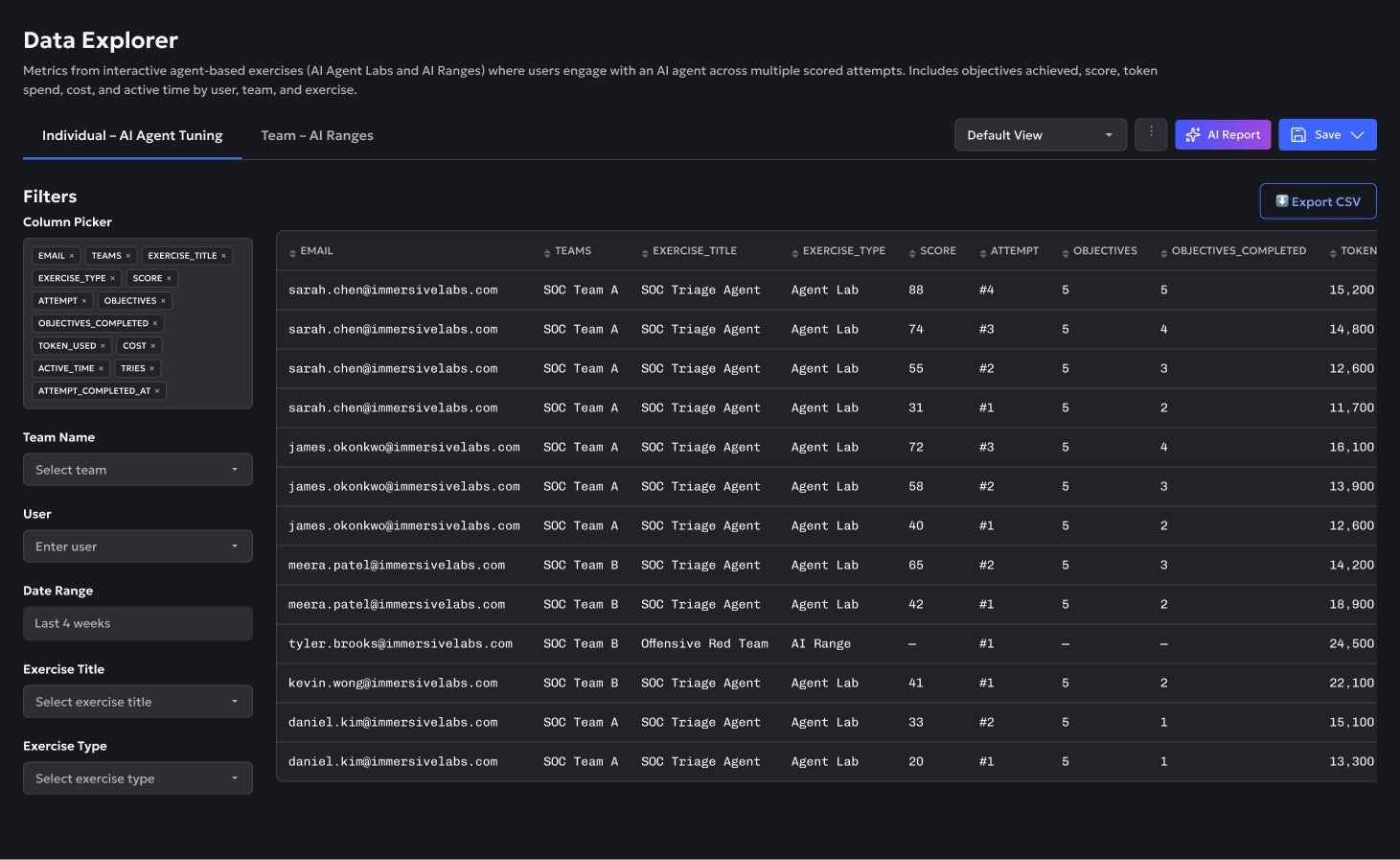
The button next to Save is where it starts.
The principles
Three principles I designed against
AI reporting can go wrong fast — confident answers nobody can verify, or complexity mistaken for insight. These are the principles I designed against to keep it trustworthy.
If an assistant tells a manager their team is falling behind, the next question is "says who, based on what." So nothing here gets to just assert a number. Every generated report comes with a "sources & method" note listing exactly which data it queried, whether a plain rule did the work or a model interpreted something, and which filters were live.
It starts with one question — describe what you want, or start from a suggestion if you don't know the field names yet.
Generate Report hands off to the assistant. It lands you on a real, editable report that leads with a plain-language summary — and because this principle isn't optional, that summary opens straight into exactly which data it queried and how. That's what "Sources & method," expanded below, actually contains.
SOC Team A① accounts for 41%① of total spend this quarter — more than the next two teams combined. At the other end, IT Risk & Compliance② has spent the least of any team, which is worth a second look before reading it as efficiency.
Sources & method
Queried 3 tables — sessions, exercises, teams — filtered to Q4, Agent Tuning only. Every number above is a deterministic aggregation, not a figure the model estimated.
| Team ↕ | Token Used | Cost | Exercise Type |
|---|---|---|---|
| SOC Team A | 2,140,000 | $18,240 | Agent Lab |
| SOC Team B | 1,410,000 | $12,110 | Agent Lab |
| Security Engineering | 1,020,000 | $8,760 | Agent Lab |
The goal was never to get people to trust the AI completely. It was to help them know when to trust it, and when not to.
A confidence score only matters if it changes what happens next. Below, two teams are flagged as likely to miss their Q1 target, each showing the trend and the AI's confidence in it. High confidence: that's the read. Low confidence: the assessment says so, and hands back control — check the trend, or the data, yourself.
SOC Team B Projected to miss Q1 readiness target Six straight weeks of decline, 81% → 58%. At risk▾
Why: Readiness has dropped every week for 6 straight weeks, 81% → 58%. A trend that consistent is safe to project forward.
Platform Engineering Projected to miss Q1 readiness target Only two weeks of data, moving in opposite directions. At risk▾
Why: Only two weeks of data so far this quarter, and they moved in opposite directions, 62% → 68%. Could recover or keep sliding — not enough history to say which.
AI should earn the right to do more over time.
Start with recommendations, guided actions, and automation as confidence grows. Users adopt AI faster when they can see value, build trust gradually, and decide when they're ready to hand over more responsibility.
The first stage looks like this: the assistant checks every session against your thresholds and surfaces what's worth a look, paired with a suggested next step — "Assign Exercises" — that you still have to click yourself.
Why this was flagged
Cost rose from a $0.94 average to $3.80 on the latest attempt, while score held flat (33 → 33). Flagged when cost more than triples without a 5+ point score gain.
Why this was flagged
Score moved by less than 3 points across the last three attempts (47 → 49 → 47). Flagged after 3 consecutive low-delta sessions.
| Team ↕ | Token Used | Cost | Exercise Type |
|---|---|---|---|
| SOC Team A | 2,140,000 | $18,240 | Agent Lab |
| SOC Team B | 1,410,000 | $12,110 | Agent Lab |
| Security Engineering | 1,020,000 | $8,760 | Agent Lab |
Once the same recommendation repeats often enough to stop being a coincidence, the offer changes — from "here's what to do" to "want me to just start doing this automatically?" Below, that shows up as the assistant noticing you've assigned the same exercise to every person with the same gap, and asking, not assuming, whether it should do that automatically next time.
| Team ↕ | Token Used | Cost | Exercise Type |
|---|---|---|---|
| SOC Team A | 2,140,000 | $18,240 | Agent Lab |
| SOC Team B | 1,410,000 | $12,110 | Agent Lab |
| Security Engineering | 1,020,000 | $8,760 | Agent Lab |
A saved report isn't a snapshot. It stays something you can question later, including questions that reach beyond it into everything else the assistant can see — still governed by the first principle: every answer cites where it came from.
IT Risk & Compliance and Platform Engineering are the ones to watch — not because either is over-spending, but because they're barely spending at all. Both sit at the bottom of token usage this quarter, and both already show up in Capability by Area's① limited-coverage list for exercises like Threat Intel Analyst. Low spend here isn't efficiency — it's absence.
| Team ↕ | Token Used | Cost | Exercise Type |
|---|---|---|---|
| SOC Team A | 2,140,000 | $18,240 | Agent Lab |
| SOC Team B | 1,410,000 | $12,110 | Agent Lab |
| Security Engineering | 1,020,000 | $8,760 | Agent Lab |